 Mealory Guides
How AI calorie trackers turn a food photo into an estimate
A photo can make meal logging faster, but it cannot reveal every ingredient. Here is what the technology can estimate, what you should review, and how to create a record useful enough to repeat.
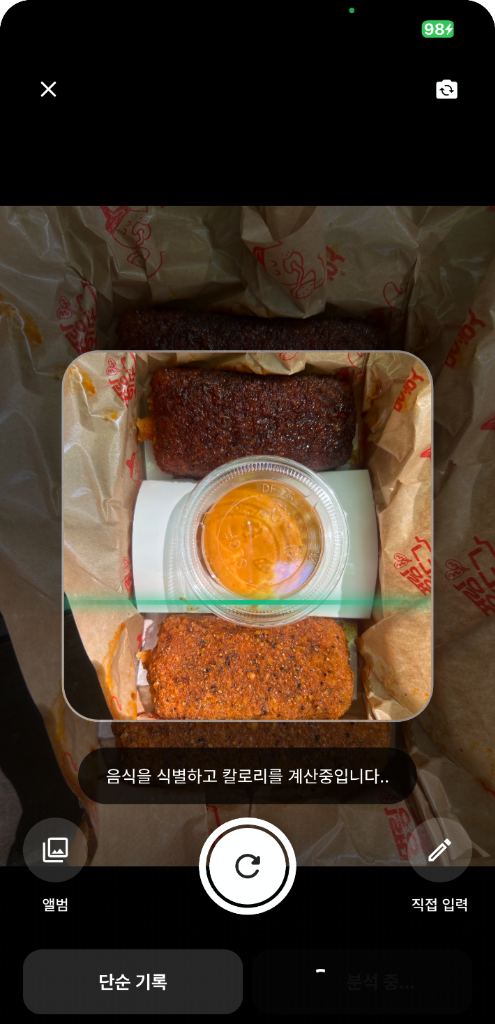
An AI calorie tracker analyzes visible foods and portion cues, then estimates calories and macronutrients. It is best used as a fast first draft—not an exact measurement. Review hidden ingredients, serving size and cooking method before saving.
01
What happens after you take a photo
The useful output is not just one calorie number. A good workflow separates recognition, estimation and user review.
- RecognizeFind visible foods
The image is analyzed for likely dishes and ingredients.
- EstimateSuggest portions and nutrients
Portion cues are translated into estimated calories, protein, carbs and fat.
- ReviewCorrect what the camera cannot know
You check sauces, oils, serving size and mistaken foods before saving.
- LearnConnect meals over time
Repeated records make timing, mood and eating patterns easier to notice.
02
Photo logging vs. manual food search
| Decision point | Photo-first logging | Manual database search |
|---|---|---|
| Best for | Fast capture of a full meal | Known packaged or measured foods |
| Input effort | Low at the start; review required | Higher; each item must be found |
| Main risk | Hidden ingredients and portion error | Choosing the wrong database entry |
| Useful habit | Photograph, review, save | Search, weigh, select, save |
Practical choice: use a photo when speed determines whether you will log at all. Add details manually when accuracy matters more than convenience.
03
Where photo estimates are most likely to be wrong
Oil, dressing, sugar and fillings may be invisible.
Stews, curries and casseroles can contain uncertain ratios.
A single angle may make a portion look larger or smaller.
Fried, grilled and steamed versions can differ substantially.
Mealory provides nutritional estimates for self-tracking. It does not diagnose, treat or replace advice from a qualified medical or nutrition professional.
04
A five-point photo checklist
- Place the entire plate or container inside the frame.
- Use bright, even light without a strong color filter.
- Photograph separate side dishes clearly when possible.
- Add sauces, oils and drinks if they are not visible.
- Review food names and portions before saving the result.
05
Frequently asked questions
Can a photo provide an exact calorie count?
No. It provides an estimate based on visible information. Exact intake requires verified ingredients and measured portions.
Should I correct every small difference?
Focus first on meaningful differences such as portion size, cooking oil, sauces and missing side dishes. A repeatable record is often more useful than an abandoned perfect one.
Can I use the result for medical nutrition decisions?
Do not rely on an app estimate for medical decisions. Consult a qualified professional for condition-specific guidance.